Audio8D
Audio8D is a Python desktop application and command-line tool that uses FFmpeg to create moving stereo audio for headphone listening.

Choose music, select a sound style, listen to a preview and create a new file. The original files are kept by default. Audio8D is for listeners who want to experiment with spatial movement and for people converting several songs from a desktop window or terminal. The perceived effect varies with the recording, headphones and listener.
Features
- Moving stereo sound with 13 built-in styles, adjustable movement, speed and room sound.
- Preview and A/B comparison before creating the final files.
- Batch conversion with defaults or separate settings for individual songs.
- MP3, FLAC, WAV, M4A and Opus output, with loudness controls.
- Saved custom styles and an optional Demucs add-on to keep the singer centered.
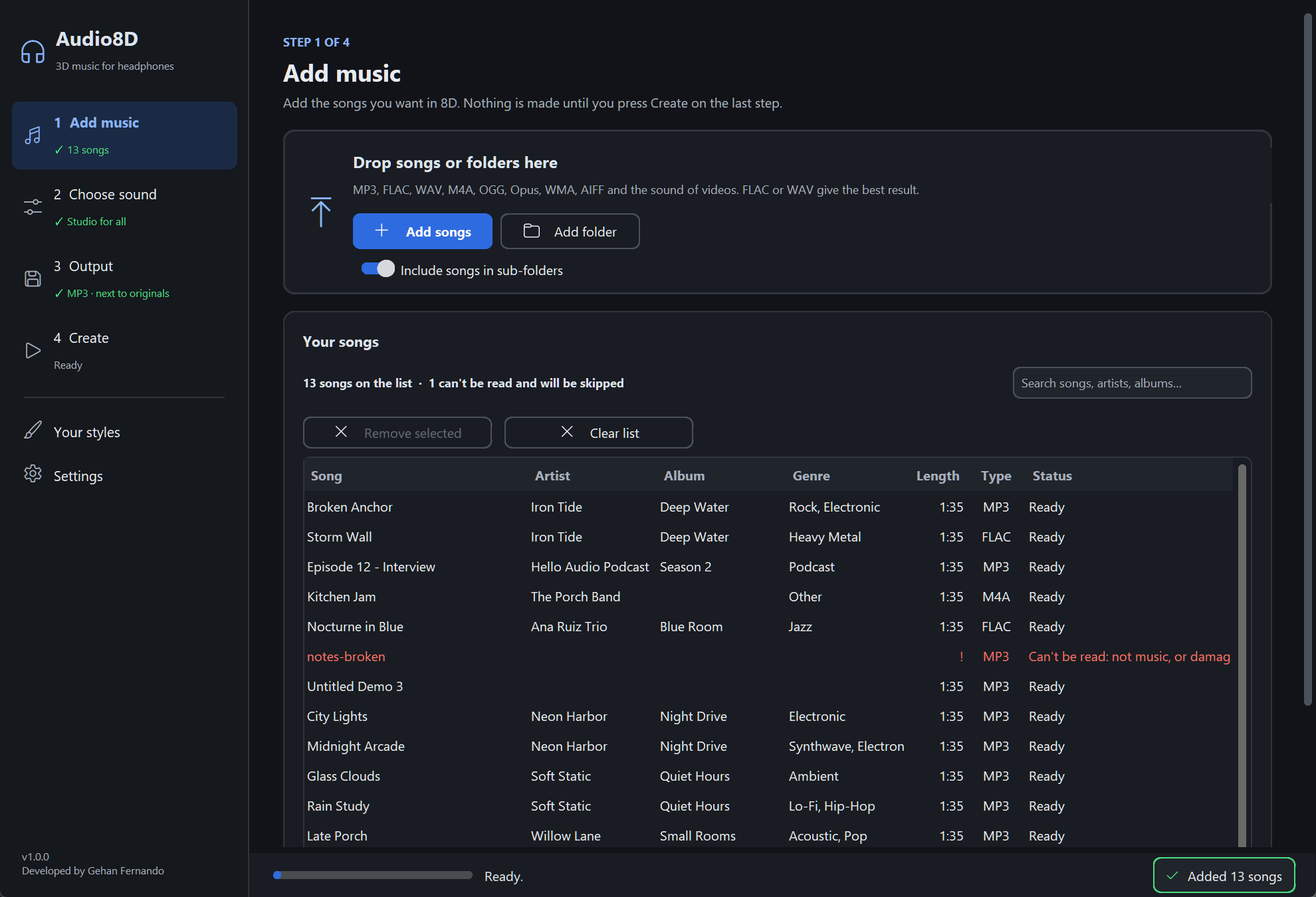
The desktop user guide includes the remaining screenshots and explains each control.
Download and quick start
Choose a checked application build from the GitHub Releases page. Each complete release includes Windows and Linux ZIPs plus SHA256SUMS.txt. GitHub’s source-code archives do not contain the built application. The repository also retains these earlier portable packages:
| System | Download | Launch after extracting the entire ZIP |
|---|---|---|
| Windows x86_64 | Audio8D 1.0.0 for Windows | Audio8D\Audio8D.exe |
| Linux x86_64 | Audio8D 1.0.0 for Linux | ./Audio8D/Audio8D |
Keep all companion files together. These packages bundle Python and FFmpeg; a separate Python installation is unnecessary for ordinary conversion. Linux desktop playback needs an available desktop/audio environment. Packages are unsigned unless a release explicitly identifies trusted signatures on the two Windows frontends; see signing and SmartScreen. Linux and unchanged third-party programs are unsigned by this project. macOS build code exists, but macOS remains untested and no macOS download is offered here.
The release workflow publishes checked Windows and Linux packages after successful pushes to main. Verify each ZIP against SHA256SUMS.txt from the same release before extracting. If a build fails, use a complete earlier release, the retained packages above or a source checkout; failed builds do not publish partial releases. The application version remains 1.0.0, with separate build tags identifying automated downloads.
Audio8D is free to use without purchasing a certificate. The proposed Code signing policy describes SignPath Foundation’s free program; enrollment has not been submitted and no provider approval exists. Signing cannot guarantee that SmartScreen will never warn.
In the window:
- Add a song or folder.
- Choose a style; start with the default Studio style.
- Preview with headphones and adjust movement if needed.
- Choose an output folder and file format, then create the new files.
Use a comfortable listening volume. Strong movement may be uncomfortable; choose a gentler style or stop if it bothers you. The optional singer add-on downloads large dependencies, uses a separate Python environment and is unnecessary for ordinary conversion.
Requirements and source installation
Source use needs Python 3.10 or newer and FFmpeg/FFprobe 7 or newer. The GUI also needs CustomTkinter, Pillow and a working Tk desktop environment. The repository carries Windows FFmpeg executables through Git LFS. On other systems, install suitable FFmpeg tools and make them available on PATH or choose their paths in Settings.
From the repository root on Windows:
python -m venv .venv
.\.venv\Scripts\Activate.ps1
python -m pip install -e ".[gui]"
audio8d --check
audio8d-gui
On Linux, activate the environment with source .venv/bin/activate instead. Your distribution may require a separate Tk package. See the platform setup guide for OS-specific steps, FFmpeg discovery and macOS limitations. A source checkout with Git LFS pointer files needs git lfs pull before using its bundled Windows tools.
Command-line usage
These examples use the installed audio8d command. In a portable package, replace it with .\audio8d-cli.exe on Windows or ./audio8d-cli on Linux, from the extracted Audio8D folder.
audio8d --help
audio8d --check
audio8d "My Song.mp3" --preview 15
audio8d "My Song.mp3" --style smooth
audio8d "My Song.mp3" --movement gentle --format flac
audio8d "My Song.mp3" --loudness -16
audio8d "C:\Music" --recursive --output-dir "C:\Music 8D" --jobs 4
To give selected songs separate settings, create songs.txt with lines such as:
"First Song.mp3" --style smooth
"Second Song.flac" --movement gentle --format wav
Then run:
audio8d "C:\Music" --per-song songs.txt
The optional singer add-on has explicit installation and removal commands:
audio8d --addon-status
audio8d --install-addon
audio8d "My Song.mp3" --vocals center
audio8d --uninstall-addon
Installation requires an internet connection, a supported local Python and space for Demucs/PyTorch. Review the add-on guide before installing. The complete CLI reference covers custom styles, output settings, cache management and all options.
Configuration
Use Settings for appearance, tool paths and saved preferences. AUDIO8D_HOME selects a separate application-data directory, useful for tests or a portable profile. The configuration reference lists platform data folders, defaults, logs and cache behavior. Custom styles describe sound settings; file-format and output-folder choices are managed separately.
Development, tests and packaging
From the repository root with an activated virtual environment:
python -m pip install -e ".[gui,dev]"
python -m pytest
python -m ruff check .
python -m ruff format --check .
GUI integration tests need a screen; FFmpeg tests need working tools. On a headless Linux runner, the workflow uses Xvfb for GUI tests. Existing tests validate README CLI examples as well as converter, GUI-model, FFmpeg, add-on and packaging behavior.
Build a package on its target operating system:
python packaging/build_release.py
The builder makes an isolated environment, installs the exact build dependencies, bundles the desktop and CLI programs plus FFmpeg and license notices, and creates a ZIP under bin. It then extracts the ZIP into a path with spaces, checks it without Python on PATH, and converts a generated test tone. Native Linux builds can use --ffmpeg-dir to choose a folder containing the required tools. See packaging and automated releases for verification, package contents and signing requirements.
Troubleshooting and limitations
- FFmpeg is missing or a song fails immediately: open Settings → System check, or run
audio8d --check, and correct the reported tool paths. - The window cannot open: confirm Tk and the GUI dependencies are installed and that a desktop display is available.
- No output was created: check the chosen output folder, permissions and the reported per-song errors.
- A preview does not play: check the desktop audio setup and open the preview in another player. The troubleshooting guide covers platform-specific behavior.
- A song asks for the singer add-on: choose a style without centered vocals or explicitly install the optional add-on.
Lossy input cannot regain information that was discarded earlier. Spatial effects are intended primarily for headphones and may behave differently on speakers or when mixed to mono. Keep source files and listen before converting a full library.
Contributing and support
Read CONTRIBUTING.md, repository standards and the documentation index. Report reproducible problems through GitHub issues. Follow SECURITY.md for vulnerability reports.
License and third-party software
Developed by Gehan Fernando. Audio8D’s own code is under the MIT License. Bundled FFmpeg, Python and libraries retain separate terms; see THIRD-PARTY-NOTICES.md and the license texts. The packaged FFmpeg builds use GPLv3. Preserve notices and the corresponding-source information when redistributing packages.