Glass.Message
Themed Windows Forms dialogs, inline inputs, progress windows and toast notifications for C# desktop applications.


Overview
Use Glass.Message when a Windows Forms application needs message dialogs with explicit themes, user input or progress reporting. It works with DialogResult and provides a fluent builder for richer dialogs.
- Message dialogs with synchronous and awaitable APIs.
- Text, password and drop-down input; checkbox state and expandable details.
- Determinate, indeterminate and activity-aware progress.
- Dark, light, Mica, high-contrast and classic themes; right-to-left layout and toasts.
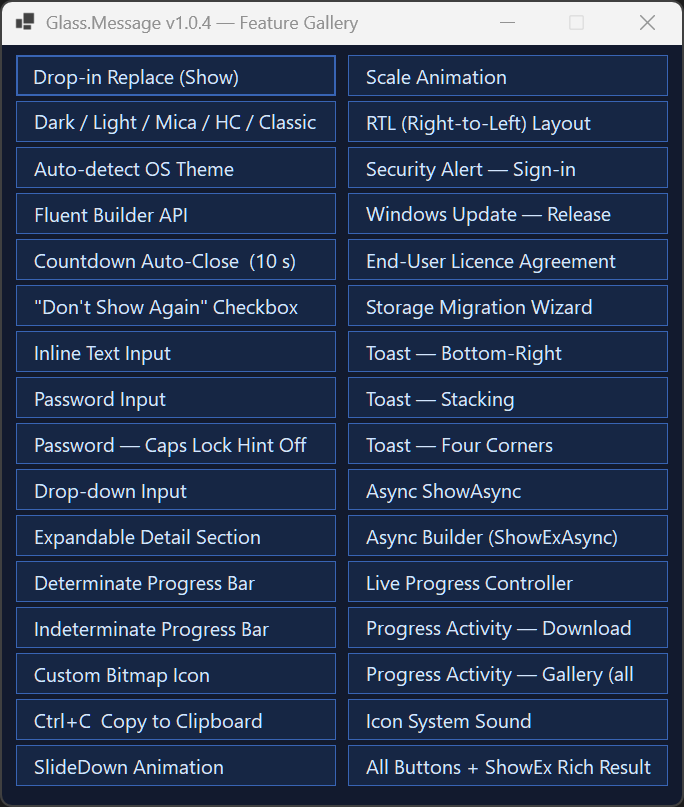
The gallery is an existing v1.0.4 screenshot; see the changelog for later changes.
Quick start
From your existing Windows Forms application directory:
dotnet add package Glass.Message
Call the dialog from a Windows Forms UI event handler on the UI (STA) thread:
using Glass;
using System.Windows.Forms;

DialogResult result = GlassMessage.Show(
    "Save your changes?",
    "Unsaved changes",
    MessageBoxIcon.Question,
    MessageBoxButtons.YesNoCancel);

if (result == DialogResult.Yes)
{
    // Save the document.
}
Migration warning: Glass takes MessageBoxIcon before MessageBoxButtons. Check and reorder arguments when replacing a MessageBox.Show call; the signatures differ.
Requirements and installation
The library is Windows-only and targets net481, net8.0-windows, net9.0-windows and net10.0-windows. NuGet selects the asset matching your application’s target framework. Building from source requires the corresponding SDK and targeting packs; running an application requires its chosen runtime.
Install through NuGet, or browse published releases for DLL packages and self-contained demo ZIPs. Extract a demo ZIP completely before launching it.
Usage
Use the builder for input and rich results:
var answer = GlassMessage.Create("Enter a display name.")
    .Title("Profile")
    .InputText("Guest")
    .Buttons("Save", "Cancel")
    .ShowEx();

if (answer.Button == DialogResult.OK)
{
    string displayName = answer.InputText;
}
Two custom button labels map to OK/Cancel; three map to Yes/No/Cancel. Use ShowEx() or ShowExAsync() to retrieve input and checkbox state. Use the awaitable methods for non-blocking dialogs, and keep calls on the UI thread.
The full usage and API reference preserves the detailed examples, theme gallery, progress-controller recipes, API tables and migration advice. See also the public facade and builder signatures.
Configuration
Global defaults are optional. Set them during UI startup:
GlassMessage.DefaultTheme = GlassTheme.AutoDetect();
GlassMessage.UseRoundedCorners = true;
GlassMessage.PlaySystemSounds = false;
AutoDetect() selects a theme when called. Call it again from your application’s theme-change handling when needed. Built-in presets are shared mutable instances; keep a separate custom theme alive until every dialog using it closes. Windows backdrop effects depend on OS capabilities.
Development and testing
From the repository root on Windows:
dotnet restore Glass.sln
dotnet build Glass.sln -c Release --no-restore
dotnet test Glass.Message.Tests/Glass.Message.Tests.csproj -c Release --no-restore
dotnet run --project Glass.Demo
Tests target all four library frameworks. UI, stress and capture tests need a Windows desktop session. Add -f net10.0-windows to the test command to check just that installed target. Inspect capture PNGs to assess rendering; their existence alone does not establish visual quality.
Builds invoke the optional signing script. Without a configured developer certificate, signing warns and output remains unsigned. See contribution guidance, release workflow and signing setup before preparing a distribution.
Troubleshooting
| Symptom | What to check |
|---|---|
| A migrated call does not compile | Put icon before buttons and check owner/default-button overloads. |
| Input or checkbox state is missing | Use a rich-result method, ShowEx or ShowExAsync. |
| An unexpected button result is returned | Custom labels map by count; three labels return Yes/No/Cancel. |
| The theme does not follow Windows changes | Refresh AutoDetect() from your application’s change handling. |
| UI-thread exception or unavailable backdrop | Call from the UI STA thread and check Windows capabilities. |
Contributing and support
Read CONTRIBUTING.md for checks and pull requests. Report reproducible problems through issues, including target framework, Windows version and a minimal example. Report vulnerabilities through the security policy.
Documentation index · Full reference · Changelog · Repository standards
License
MIT, copyright Gehan Fernando. See LICENSE.
Detailed reference
The full reference preserves the detailed API guide, historical measurements or screenshots, and examples previously included here.